Thursday, December 24, 2020

SharePoint: How to get Retrieve Publishing image field with SharePoint 2013 REST Api / CSOM

Below rest api code get publish feature fields 


function getPublishingPage(webUrl,listName,listItemId,publishingProperties, success, failure) 

{

    var itemUri =  webUrl + "/_api/web/lists/getbytitle('" + listName + "')/items(" + listItemId + ")";  

    getJson(itemUri,

       function(data){

           var pageItem = data.d;


           var selectProperties = [];  

           for(var idx in publishingProperties){

               if(!pageItem.hasOwnProperty(publishingProperties[idx])){

                   selectProperties.push(publishingProperties[idx]);

               }

           }

           if(selectProperties.length > 0) {

              //construct an additional query 

              var query = '/FieldValuesAsHtml?$select=' + selectProperties.join(',');

              var endpointUri = pageItem['__metadata'].uri + query;

              getJson(endpointUri,

                 function(data){

                    for(var property in data.d){

                       if(property == "__metadata") continue; 

                       pageItem[property] = data.d[property];   

                    }

                    success(pageItem);  

                 },

                 failure);

           } 

           else {

              success(pageItem);

           }   

        },

       failure);

}

Unauthorized exception while downloading file from SharePoint

In this article, How to download the SharePoint  library files in Document Library


 var file = clientContext.Web.GetFileByServerRelativeUrl(fileRef);

                clientContext.Load(file);

                clientContext.ExecuteQuery();                    

                ClientResult<Stream> streamResult = file.OpenBinaryStream();

                clientContext.ExecuteQuery();

#sharepoint #SharePoint Developer/  #O365 #Administrator/ #NET #jQuery #AngularJS #poweapps #powerautomate #spfx #pnp #workflo

Thursday, December 17, 2020

Disable Delve in SharePoint Online?

 Login to your SharePoint Admin Center

Click on "Settings" from left navigation >> Click on "classic settings page" in the bottom>> Under Office graph, Select "Don't allow access to the Office Graph"


Click and Save the button

Monday, December 14, 2020

SharePoint Installation Error : Application Server Role ,Web Server Roll Configuration Error

 
SharePoint Installation Error : Application Server Role ,Web Server Roll Configuration Error

You have a couple of options here:

Enable .Net 3.5 on the server and retry the pre-requisite installation.
Manually add the required features using PowerShell.


The PowerShell to add the required features is:

Import-Module Servermanager

Add-WindowsFeature NET-HTTP-Activation,NET-Non-HTTP-Activ,NET-WCF-Pipe-Activation45,NET-WCF-HTTP-Activation45,Web-Server,Web-WebServer,Web-Common-Http,Web-Static-Content,Web-Default-Doc,Web-Dir-Browsing,Web-Http-Errors,Web-App-Dev,Web-Asp-Net,Web-Asp-Net45,Web-Net-Ext,Web-Net-Ext45,Web-ISAPI-Ext,Web-ISAPI-Filter,Web-Health,Web-Http-Logging,Web-Log-Libraries,Web-Request-Monitor,Web-Http-Tracing,Web-Security,Web-Basic-Auth,Web-Windows-Auth,Web-Filtering,Web-Digest-Auth,Web-Performance,Web-Stat-Compression,Web-Dyn-Compression,Web-Mgmt-Tools,Web-Mgmt-Console,Web-Mgmt-Compat,Web-Metabase,WAS,WAS-Process-Model,WAS-NET-Environment,WAS-Config-APIs,Web-Lgcy-Scripting,Windows-Identity-Foundation,Xps-Viewer -verbose

The PowerShell above adds all of the features that the pre-requisite installer adds.


Wednesday, December 9, 2020

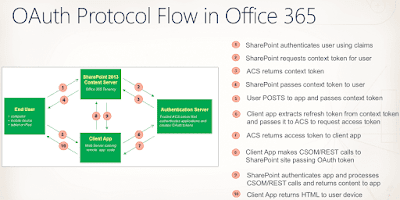
Could not authenticate to SharePoint Online using OAuth 2.0

SharePoint Online using OAuth In this article ,

Could not authenticate to SharePoint Online using OAuth 2.0

 $username = "test@am.onmicrosoft.com"

$password = "******"


$cred = New-Object -TypeName System.Management.Automation.PSCredential -argumentlist $userName, $(convertto-securestring $Password -asplaintext -force)


Connect-SPOService -Url https://finders-admin.sharepoint.com -Credential $cred