

Sunday, August 9, 2020

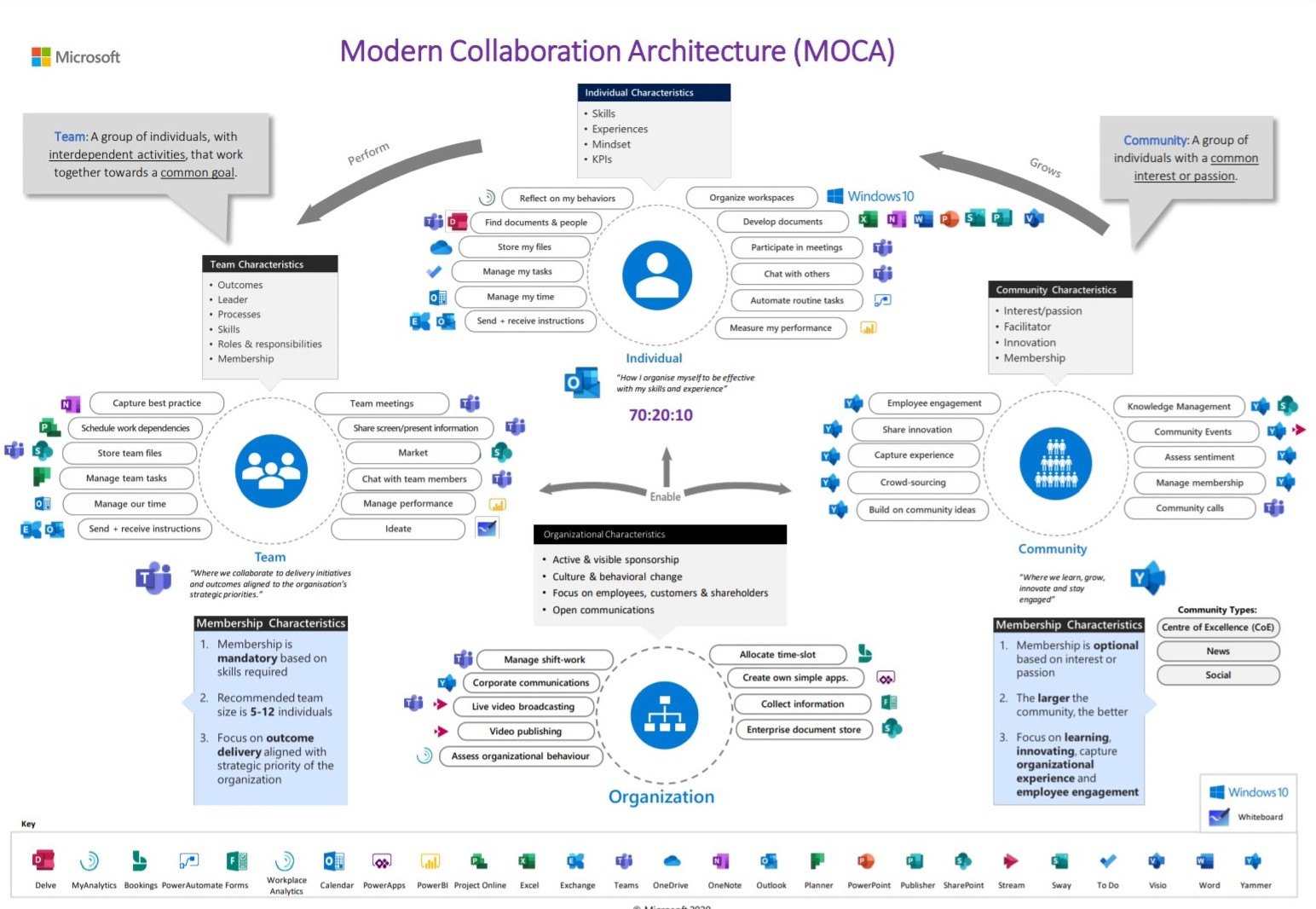
MOCA

Modern collaboration architecture for #microsoft365#SharePoint #microsoftteams #powerapps

Friday, July 24, 2020

powershell update Peoplepicker in List In SHarePoint

#Read the CSV file 
#stored local variable 
$delimitercsv = "|" 
$filePath = "C:\peakfinders.csv" 
$userid = "EmpID"
$useremailowner = "Owner"

#Get the SharePoint List
$tWeb = Get-SPWeb -identity "http://sharepoint.peakfinders.com" 
$list = $tWeb.Lists["Employee"]
$CSVData = Import-CSV -path $filepath | ForEach-Object {
    Write-Host "$($_.ID) ,$($_.'Email-Address')";
foreach($sitem in $items)
{

$userid = $sitem['EmpID']
if($userid.LookUPid -eq $($_.ID)){
$sitem["mail"] =$($_.'Email-Address');
$sitem.Update()
}
}
}

JavaScript : How to Convert UTC Date Time to local/EST Hours using JavaScript?

In this below script, Convert UTC Date Time to local/EST Hours

Convert UTC Date Time to local/EST Hours In SharePoint
In this article , we will use default java-script action

Type 1:

var localTime = new Date();
var localKolkata = moment.tz(localTime, "Asia/Kolkata").format("hh:mm:ss");

Javascript script provide date and time format.

Type 2:

function getLocalTime(i) {
    if (typeof i !== 'number') return;
    var d = new Date();
    var len = d.getTime();
    var offset = d.getTimezoneOffset() * 60000;
    var utcTime = len + offset;
    return new Date(utcTime + 3600000 * i);
}

#sharepoint #javascript #datetime #jquery #convertdatetime

Wednesday, March 11, 2020

New Visual studio code 1.43 version updated PowerShell 7 version

Visual Studio code 1.43

Big structural changes integrated for MS PowerShell users'. Hereafter Developer favorite tools in Visual Studio Code.


PowerShell user and a fan of the Integrated Scripting Environment (ISE), you now have the option to flick on ISE mode in Microsoft's Visual Studio Code (VS Code) cross-platform code-editing tool. 

The new PowerShell extension preview for VS Code includes a 'switch' that developers can flick on in VS Code to replicate the ISE experience in PowerShell version 6 and below. 

ISE is no longer supported in the PowerShell extension for VS Code even though Windows still ships with ISE. Now users need VS Code with the PowerShell extension and can type a simple editor command to enable or disable ISE Mode. The new PowerShell extension preview for VS Code includes a 'switch' that developers can flick on in VS Code to replicate the ISE experience in PowerShell version 6 and below. 


ISE is no longer supported in the PowerShell extension for VS Code even though Windows still ships with ISE. Now users need VS Code with the PowerShell extension and can type a simple editor command to enable or disable ISE Mode. 


The PSReadLine module with syntax highlighting, multi-line editing, and back search is also now part of the VS Code integrated console for Windows, macOS, and Linux, satisfying a top user request, according to Microsoft. 

Read more

https://code.visualstudio.com/updates/v1_43


Wednesday, June 13, 2018

Extending a Web Application in SharePoint 2010

The steps to extend a Web application using Windows-classic authentication in Windows PowerShell is as follows:
·         On the Start menu, click All Programs.

·         Click Microsoft SharePoint 2010 Products.

·         Click SharePoint 2010 Management Shell.

·         To extend a Web application to the same port, but with a different host header, at the Windows PowerShell command prompt, type the following command:

Get-SPWebApplication –Identity <Identity> | New-SPWebApplicationExtension -Name
<Name> -HostHeader <HostHeader> -Port <Port> -Zone <Zone> -URL <URL>

Where:
·         <Identity> is the Web application that you want to extend.
·         <Name> is the name of the new IIS Web site in the Web application.
·         <HostHeader> is the host name assigned to this zone of the Web application.
·         <Port> is the port on which this zone of the Web application can be accessed.
·         <Zone> is the zone with which this new extension is to be associated.
·         <URL> is the public URL for this Web application zone.